Spring Hill KS, 66083

- Home
- > Blog Main Page
- > Analytics & Tracking
- > The monthly SEO report nobody reads twice
The monthly SEO report nobody reads twice
10.09.2026
DoveWebConsulting

It's the first of the month, and the SEO report lands in your inbox. It comes from your SEO agency, the company you pay to get your business found on Google. You open the PDF looking for one answer: did this bring in work? The first page says clicks are up and you now show up on Google for 9 more searches. Neither one tells you if the phone rang. Then comes a chart, and another chart after that. You're paying for this every month, so you scroll to the end and nod.
Half of it may not make sense to you, and that's common. One business owner I work with stopped me while we looked at her own traffic: "I hear people talk about organic all the time, organic something. Organic. I try to understand it, but I don't."
She runs her own business. She isn't slow. Nobody had ever explained those words to her. A report full of them would never give her a choice she could make.
That's the real pain: paying every month for something you can't judge, and wondering if the problem is you. It isn't. An effective monthly SEO report answers one question you can answer in 20 seconds: should you keep paying, and what happens next? Most reports never ask it. This post shows you what a good one looks like, and when the right answer is stop.
Why doesn't your SEO report tell you if it's worth the money?
Because it was built to save your agency time and keep you paying, not to show you what you got for it. The tools that make most reports say so on their own sales pages.
One report tool sells agencies on this promise: "We enable you to double client retention by sending out the Website Report monthly." In other words, the report is there to keep twice as many customers paying. The same company says its report brings an agency's work on each client down to "15 minutes per month." (marketgoo, read October 7, 2026).
A second tool puts it in hours. Its sales page tells agencies that a report made by hand takes "6–8 hours per client," and theirs takes "15 minutes." The same page promises reports that "justify retainers," which means making you feel the monthly fee is worth it. (Swydo, read October 7, 2026).
So the report you get each month was often designed to take your agency 15 minutes and to keep you paying. It was never built around your decision.

What is an effective SEO report?
Think about a blood test.
The lab sends a printout with forty numbers. Some have a little H or L next to them. You can read every line and still not know what to do.
Then the doctor looks at it with you. "These two matter. This one is fine for now. Take this, stop taking that, and we'll check again in three months." That's the part you needed.
Most monthly SEO reports are the printout. An effective one is the doctor's orders. Every line in it has five parts:
- The number. Calls from Google this month, or new customers who found you in search.
- Where it came from, and the day it was pulled. "Your Search Console (a free Google tool), pulled October 3." Numbers move fast. A number without a date can be weeks old and look like today.
- What it changes. If a number can't change what you do next month, it's decoration.
- Who acts. One person, by name.
- By when. A date, not "soon."
The parts that go missing most are the last two: who acts, and by when.
A remodeling company I work with had a blog post about how often to reseal grout. Over 90 days, Google showed it to people 3,269 times. It got 6 clicks.
That line led to a real fix, with one person in charge and a date. The fix was ours, and we made it on June 27, the day we found it. We gave the post a title with a number, rewrote the short description Google shows under the title, and put the answer in the first lines. We added a table comparing two kinds of sealer, and answered eight questions people search for.
In the next 88 days, Google showed the post 7,548 times, and it got 24 clicks. Out of every 1,000 people who saw it, about 2 clicked before and about 3 clicked after. We had hoped for 20, and we didn't get there. The numbers are small, and the whole site was growing too. But the work got done, because someone owned it and it had a day.
The date matters too. The sample report a big SEO tool shows buyers today is built on February 2024 numbers. Nothing on the page tells you that unless you look for it. (Semrush sample report PDF, read October 7, 2026).
And "where it came from" matters for a simple reason: you should be able to open the same number yourself. If your report says "clicks from Google," that number lives in your own Search Console.

How can your report hide a month that lost you money?
Say your phone rang less this month than it did last spring, and a regular customer went to the shop down the street. Then the report arrives covered in green arrows. Traffic is up 20%, and you rank for 11 new searches. You paid for that month, and the report made you feel good about it. It rarely takes a lie to do that. Usually it's a number nobody checked, or a keyword list that quietly drops the ones that slipped.
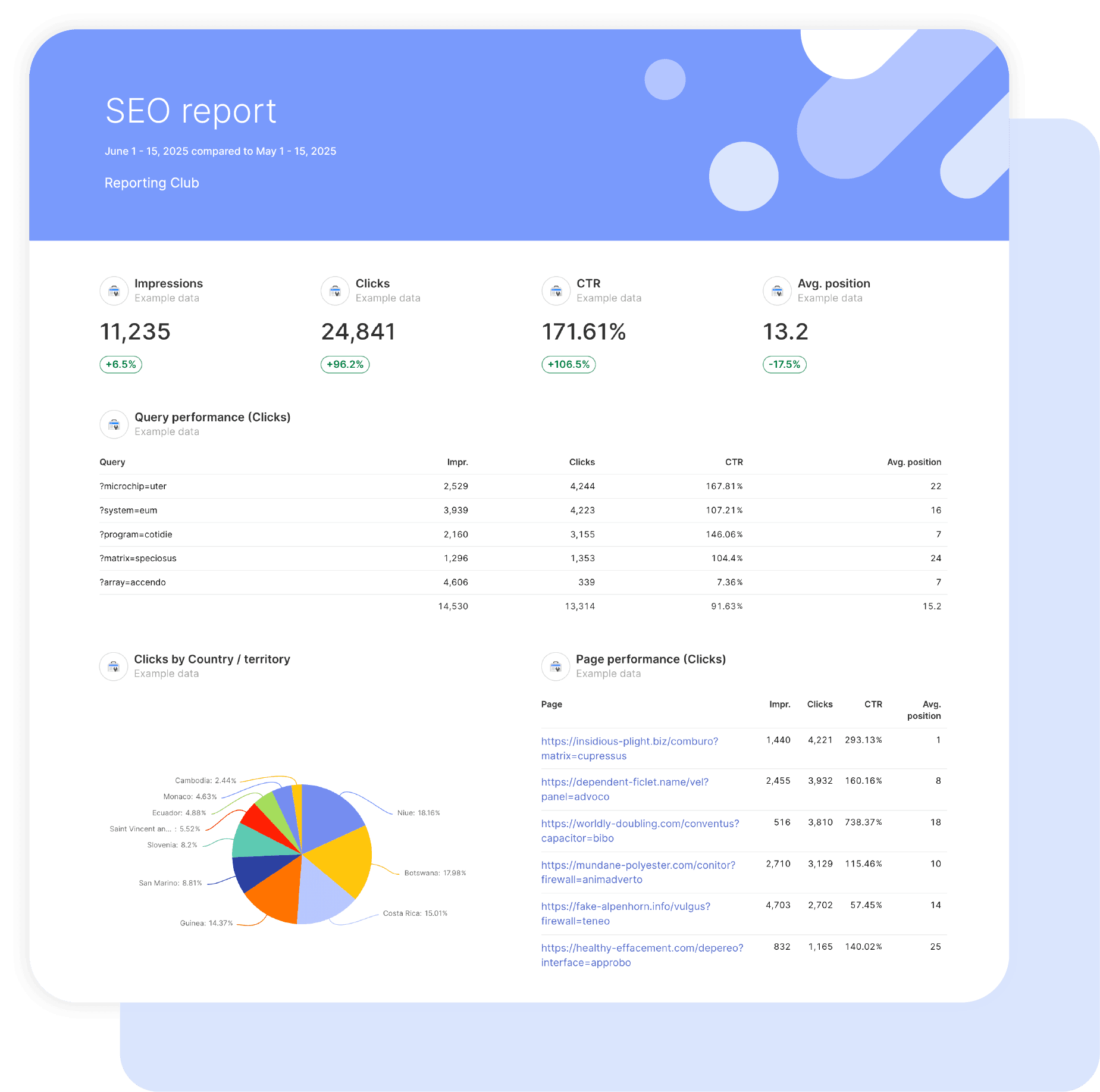
Google defines impressions as "how often someone saw a link to your site on Google." (Search Console Help, read October 8, 2026). Clicks can never be higher than impressions, because you can't click a link Google never showed you. One report tool's own sample report, the picture it uses to sell the product, shows 11,235 impressions and 24,841 clicks. That says more people clicked than ever saw the link, which is impossible. The sample even gets its own math wrong: it lists a click rate of 171.61%, but 24,841 divided by 11,235 is 221%. The sample is labeled "Example data," and it was still on the sales page when I checked. (Swydo sample image, viewed October 7, 2026).
Some numbers can't be checked at all. A big SEO tool's sample monthly report opens with traffic numbers for a site it doesn't own. It never says how an outside tool got another company's traffic, and the word "estimate" never appears. The same sample never uses the word "conversion" once. A conversion is the action you want a visitor to take, like a call or a form. Google Analytics calls these key events: "an action that's particularly important to the success of your business." (Analytics Help, read October 8, 2026). (Semrush sample report PDF, read October 7, 2026).
Then there's the uncheckable excuse. A free report template from a big SEO news site coaches the agency on what to say when traffic drops. Its notes tell the agency to call it "invisible discovery," people finding you through AI tools, "even if it doesn't show up in GA or GSC yet" (Google Analytics or Search Console). (Search Engine Land template deck, read October 7, 2026). Maybe that's true. But if nobody can measure it, it can't explain a drop. Ask what number would show it, and when.

Small counts jump around on their own. Say you got 16 calls last month. This month you might get 12, or 20, even if nothing about the SEO work changed. Some months more people need you, and some months fewer do.
So don't judge a month by a small jump. Use this table instead. Take this month's calls and the calls from the same month last year, and add them up. Find that total on the left. The number on the right is how big the jump must be before it means something.
| Calls from both months added up | The jump must be at least |
|---|---|
| 20 | 9 |
| 40 | 13 |
| 60 | 15 |
| 100 | 20 |
| 200 | 28 |
| 400 | 40 |
For example, say you got 16 calls last May and 24 this May. 16 plus 24 is 40, so the jump must be at least 13. This jump is only 8, so it doesn't count yet. Weather and busy seasons add even more ups and downs. So treat the table as the smallest jump that matters. If a report cheers 16 calls going to 20, it's cheering a normal month.
Why the same month last year? Most businesses have busy months and slow months. A pool cleaner's June will beat his February every year. You can check this yourself in Google Search Console. It keeps 16 months of numbers, and its Compare tab shows two time periods side by side (Search Console, checked October 7, 2026).
Watch the keyword list too. Keywords are the words people type into Google to find a business like yours. If this month's list is different from last month's, ask what was taken off. One SEO company's own guide on writing reports warns against "swapping out the terms that went backwards." (The SEO Agent, read October 7, 2026). A list that drops every keyword that slipped will always look good.
And a call isn't a customer. Some calls are spam, wrong numbers or people looking for a job. Ask how many calls turned into a paying customer. That's the number that pays your bills.
Five quick checks you can do yourself:
1. Clicks are lower than impressions.
2. Every number says where it came from.
3. Any number an outside tool guessed is labeled "estimate."
4. This month sits next to the same month last year.
5. The keyword list is the same one as last month.

Why does a report with no decision get ignored?
Because a number with no decision attached gets ignored.
A remodeling company owner I work with asked a smart question himself: had his work to show up in Kansas City searches helped in three months? His Kansas City search impressions were up 86%. His clicks hadn't moved. And his whole site was growing anyway, so we couldn't tell what caused the rise. Nothing was decided after that, and we talked about something else. I don't know if a clearer question at the end would have changed that. Nobody asked one.
Even Google does this. If you own a website, Google Search Console may have emailed you something like "Congrats on reaching 40 clicks in 28 days!" It feels nice. It doesn't tell you whether those clicks turned into a single phone call.
An unread report usually isn't a lazy owner. It's a report that never asked the owner to decide anything.

How should your report tell you what to do next?
Every to-do in the report should be a yes-or-no question for you, with the agency's suggestion next to it. "Should we do A or B?" gets a fuzzy answer and has to be asked again. "Should we do A? Yes or no" gets answered.
The same company had three five-star Google reviews with no reply, the oldest from May. That row should read: "Three five-star Google reviews, the oldest from May, have no reply. Reply this week? My suggestion: yes. Who: you. By: Friday."
Can you check your report's numbers yourself?
The numbers are yours. Most of what's in an SEO report comes from Google Search Console and Google Analytics, two free Google tools tied to your website. You own those accounts, and you can see the same numbers your agency sees.
Reading them is another story. I showed the owner from the start of this post her Search Console, and she didn't understand it. The screen is built for specialists, full of words like impressions and average position (how high you show up, on average). So I built her a dashboard, one simple screen that pulls the same numbers and labels each one in words she uses. Once she could read it, she put it in her own words: "I understood once you showed me how the Google Search Console tells me what happens before someone reaches my website." She saw people arriving with nothing for them to do, and said it herself: "I'm just simply sending more people into a funnel that's already leaking." People were coming to her site, and most were leaving without reaching out. She turned the work toward her service pages.
She checks that every label means exactly what it says. When the name of the dashboard on her screen didn't match what I had called it, she stopped me: "When you sell me something, I look for the exact wording." A minute later she asked whether the visit counts included her own team's visits. Ask the same of your report. If a row says "visits," ask whether your own team's visits are in it.
Ask your agency for access to both accounts. If the screens don't make sense to you, that's normal, and it isn't your job to learn them. It's your agency's job to show you the same numbers in words you use, every month.

When should you stop or pause the SEO work?
Stop if nobody, not even you, can say what the work is for.
A report can only show progress toward a goal. If the goal was never written down, the agency shows you clicks instead, because some click number is always going up somewhere. So before you judge any report, answer four questions about your own business. Your agency should have asked them on day one.
1. What does the business need most in the next six months? It might be more calls for one service, or a busier slow season. Pick one.
2. Who is the customer you want more of? "Anyone nearby" is not an answer. A dentist may want families who stay for years over people hunting a $49 cleaning coupon. A roofer may want insurance jobs instead of $200 patch jobs. The work should bring in that person.
3. What does that customer need to understand before they reach out? Maybe that you can come today, what it roughly costs, or that you take their insurance. If your pages don't answer that, more visitors just means more people leaving with the question still open.
4. What should they do next? Call, book online or come in. Every page needs one clear next step.

Hold the work up against those answers. A dentist's post on whitening your teeth at home can bring 2,000 visitors who never plan to book. That's real traffic from the wrong customer, and it shows up in the report as a win.
Pause the work when any of these is true:
- Nobody can name the goal the work is chasing.
- Your pages don't answer what your customer needs to know.
- A new customer costs more than they bring in.
Stop doesn't mean firing anyone. The owner above saw that more traffic wouldn't fix her problem, and turned the work toward her service pages.
None of the report templates I read had a box for stop. A good report leaves room for it.
You don't need an industry average. Use your own numbers. Say you pay $1,200 a month and search brought you 12 new paying customers. Each one cost you $100. If an average customer brings you $400 after your costs, search is paying for itself. Our post on whether to start with SEO or paid ads (PPC) has a calculator for this.
Which part of search brings in your customers?
"Search" isn't one thing. People find a local business in four places, and each one does a different job:
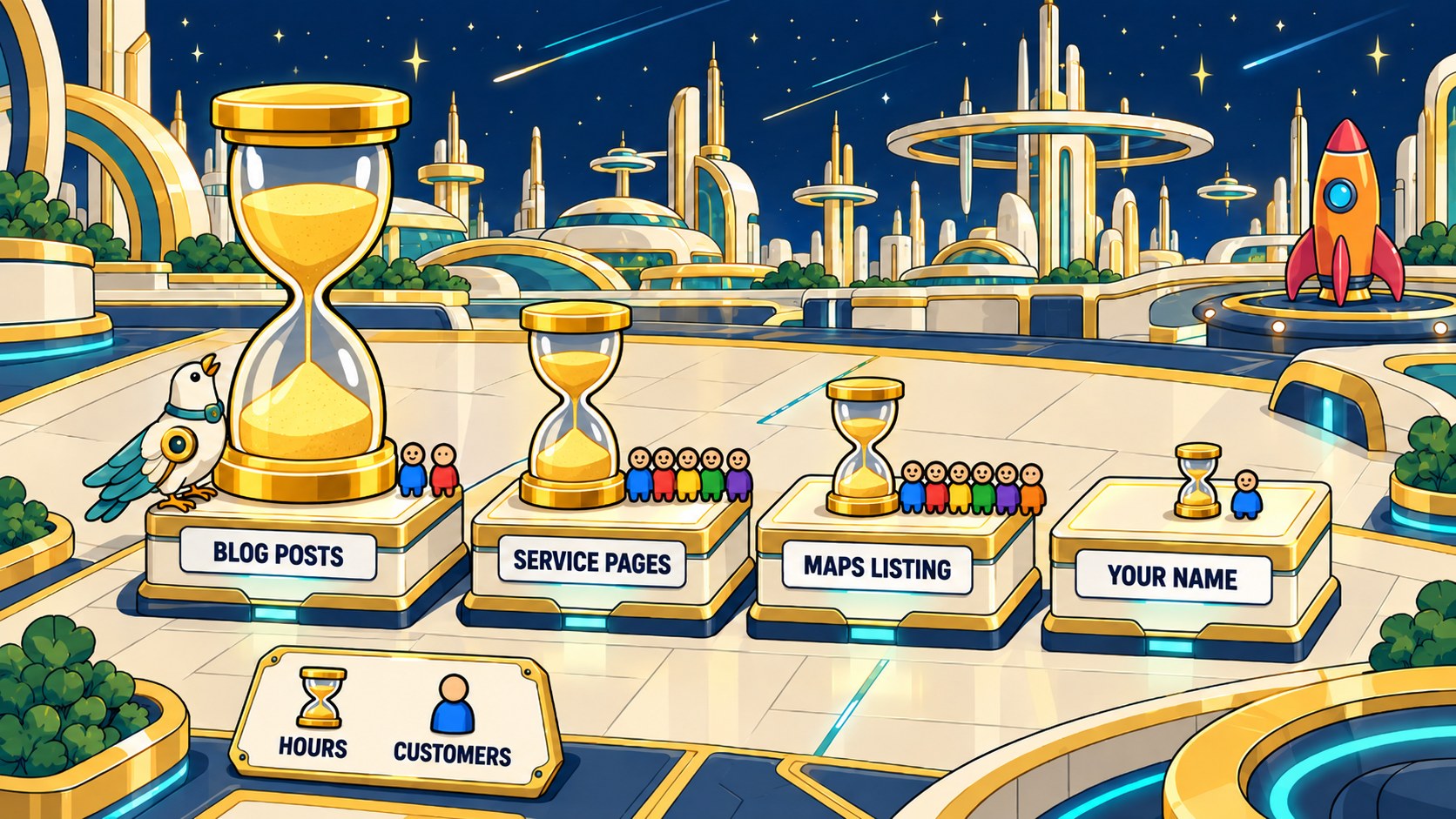
- The Google Maps listing. The box with your reviews, your hours and a call button. It catches people who need someone nearby, now. It works fast, but it can only grow so much: only so many people near you search each month, and only three businesses show in that top box.
- Service pages. The page about drain cleaning, the page about water heaters. They catch people comparing options before they pick. They take months to move up in Google search results, and they win or lose on whether they answer what your customer needs to know.
- Blog posts. They reach people before they need you. A blog post rarely brings a call the same day. Its job is to make your name familiar to the right people.
- Searches for your business name. These people already know you, and something put your name in their head first: your truck, a neighbor, a post they read last spring.
A good report shows new customers from each part, next to how much of the work went into each. Say your SEO hours went 70% to blog posts, 20% to service pages and 10% to your Maps listing. Your 14 bookings came 6 from Maps, 5 from service pages, 2 from blog posts and 1 from people searching your name.
Most of the hours went to the part that brought the fewest customers. The lazy fix is to move every hour to Maps. Ask these questions first:
1. Did the blog start some of the other sales? Someone reads your post in March and searches your name in May. The report gives the name search all the credit. Google Analytics has a report for this called attribution paths, which Google says "helps you understand the different paths users take to complete key events" (Analytics Help, read October 8, 2026). Your agency can pull it.
2. Is the blog written for your customer? A post on fixing a leaky faucet yourself brings people who want to skip the plumber. If the topics are wrong, the fix is better topics, not fewer hours.
3. How much room is left on Maps? If your listing is complete and your reviews are strong, more hours there may buy very little. Ask what the extra hours would do.
4. How old is the work? A page written last month hasn't had time to climb. Judge a page after a few months. Judge Maps sooner.
5. Which customers were worth more? If the 6 from Maps were $150 drain clogs and the 5 from service pages were $4,000 water heater installs, the service pages brought in far more money. Count dollars, not just heads.
Say your agency pulls those numbers. The attribution paths show 3 of the 6 Maps customers read a blog post first. Two of the blog posts were do-it-yourself fixes that brought nobody who hires. The Maps listing already has 90 strong reviews. And the 5 service page customers were water heater installs. So the answer isn't "move everything to Maps." Keep the blog posts that start sales, drop the do-it-yourself topics, and put those hours into service pages. A report that only counts heads would have sent you the wrong way.
You can find most of these numbers yourself. Your Google Business Profile shows calls from your Maps listing. Search Console shows which pages people clicked. Your own sales records show which calls became customers. Ask your agency what share of this month's hours went to each part.
Not sure which page a call came from? Ask every caller how they found you, and write it down. Or ask your agency to put a different phone number on each page, so you know which page made the call.
What counts as a win?
Not every number in your report is worth the same. Rank them by how close they are to money:
1. A sale or a booking. Someone paid you or hired you.
2. A real call. Someone talked to you for more than a minute.
3. A real form. Someone asked for a quote, not a spam bot.
4. A request for directions. Someone planned to come by.
5. A visit or a click. Someone looked.

The top one is your main goal: the result you're paying the agency to get. Pick it with your agency and have every report judge the month against it. Ten more clicks and zero more customers is not a good month.
Most reports lead with clicks because clicks are easy to count. They're also the furthest from money. Google Analytics calls the actions it counts as wins key events. Your agency sets them up. Visits and clicks don't belong on that list. Calls over a minute, real forms and sales or bookings do. Ask which ones are set up, and make sure a 10-second call or a test form doesn't count.
Where are you losing customers?
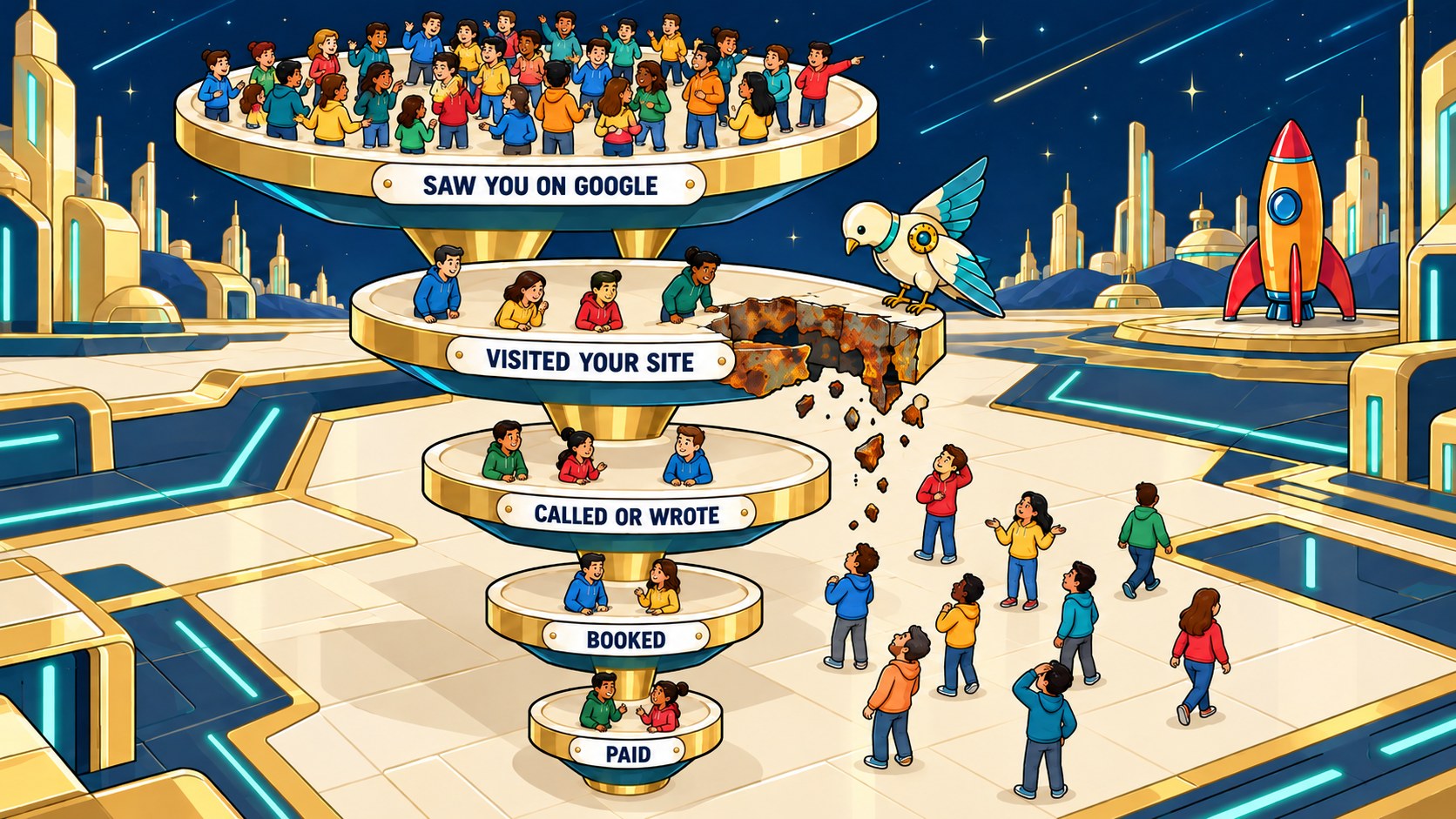
Every customer who finds you in search takes the same five steps. A good report counts each one:
1. Saw you on Google. Search Console calls this impressions.
2. Visited your site. Clicks.
3. Called or filled a form.
4. Booked or ordered.
5. Paid.
People drop out at every step. The report should show how many, and whose job it is to fix each gap.
Say 5,200 people saw the business on Google, 180 visited the site, 31 called or wrote, 14 booked and 12 paid.
- Seen, then not clicked. Most people never click, and that's normal. Better titles in Google help a little. That's the agency's work.
- Visited, then left without calling. 149 of 180 people left. This is usually the biggest fixable leak: the page didn't answer their question or show a way to call. Also the agency's work.
- Called, then didn't book. 17 of 31. Missed calls, slow replies or price. That one is yours, not the agency's. Start with your phone's missed-call list, and call every one back the same day.
- Booked, then didn't pay. 2 of 14. No-shows and cancellations. Also yours. A reminder text the day before cuts some of them.
Fix the biggest gap that's in your control first. Sending more people into a leak only makes the puddle bigger.
The report was built to take fifteen minutes of your agency's month. It should take twenty seconds of yours.
How do you score your own SEO report?
The infographic in this section walks through one sample report, part by part, and ends with a score you can give your own. The business is made up. Its numbers are the same examples used in this post.
The infographic, in words:
1. Customer cost. $1,200 a month in SEO fees, divided by 12 paying customers, is $100 to get one customer. That customer brings in $400.
2. Where the hours go. Blog posts got 70% of the SEO hours and brought 2 bookings. Service pages got 20% and brought 5. The Google Maps listing got 10% and brought 6. Searches for the business name got no hours and brought 1.
3. Where customers drop off. 5,200 people saw the business on Google, and about 3 in 100 clicked, which is 180 visits. About 17 in 100 visitors called or wrote, which is 31. That is the leak, and the agency fixes it. About 45 in 100 of those 31 booked, which is 14, and about 86 in 100 of those 14 paid, which is 12.
4. Is the jump real? Calls went from 16 last May to 24 this May. A jump this small can be chance. Calls need to reach about 29 before you call it progress.
5. What happens next. The agency fixes the service pages that get visits but no calls, within 2 weeks. You call back every missed call the same day, starting now. Then you make this month's decision: keep the SEO as it is, change the service pages, or stop.



Now score your own report. Give it one point for each of these it clearly shows:
1. Paying customers. It counts customers who paid, not just clicks or calls.
2. Customer cost. It shows your SEO fee divided by new paying customers.
3. Search channels. It shows where the hours went and what each brought in.
4. Customer losses. It shows where people drop off and who fixes it.
5. Fair comparison. It compares the same month last year before calling it progress.
6. Next action. It names each fix and the person who owns it.
A score of 6 means go: act on what the report shows. A 4 or 5 means hold: ask your agency to add the missing answers. A score of 0 to 3 means no-go: ask for a better report before you judge the SEO. The score grades the report, not the SEO work.
Questions people ask about monthly SEO reports
What does an SEO report look like?
One page. What customers cost you first, one question for you last.
What should an SEO report include?
What each new customer cost you, which part of search brought them in, your main win, where customers dropped off, and one question for you. Every number should say where it came from and when.
Can I check my own SEO numbers?
Yes, for free. Ask your agency to make you an owner of your Google Search Console account.
How do I know if my SEO report is telling the truth?
Start with clicks. If there are more clicks than impressions, the report is wrong.
Is SEO still worth it in 2026?
It's worth it when your report can show calls or customers that came from search, next to what you paid. If your report can't show that, that defeats the purpose of an SEO report. So fixing the report comes first.
Can I do SEO myself?
Checking the numbers, yes. Doing the work is a bigger question than a report can answer.
If you'd like a second set of eyes, send me your last SEO report. I'll mark the five parts on every row and tell you what's missing. Request a free site analysis.